

New 10 Saree for Evening Parties AI Prompts for Glamorous Occasions
Evening parties call for a saree that speaks elegance, confidence, and a touch of drama. This collection of ten AI image prompts captures the glamour of Indian women in pastel sarees, each scene designed to evoke a distinct mood—nostalgic, modern, regal, or dreamy. Whether you are editing a personal photo or crafting a fresh visual, these prompts help you produce images that feel both aspirational and authentic.
The prompts span a range of fabrics like chiffon, linen, and Banarasi silk, paired with settings from sunlit courtyards to urban backdrops. Each one focuses on full-body poses and subtle expressions, ensuring the saree and the woman’s personality shine together. Use these ideas to generate photos that stand out at any glamorous occasion.
What this evening-party saree collection is asking for
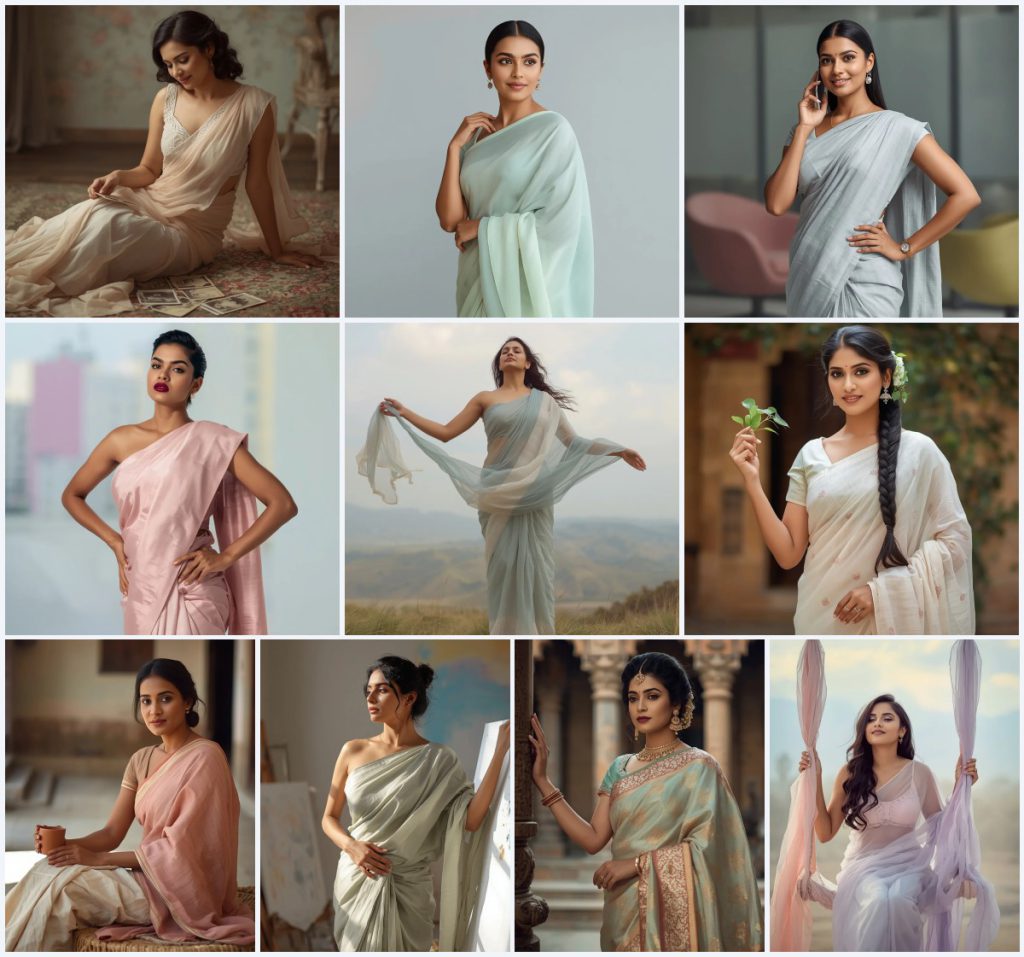
This collection of ten prompts revolves around Indian women wearing pastel sarees in elegant evening-party settings. The common thread is a glamorous yet refined aesthetic, with each prompt adding a unique twist—vintage photographs, a bold lip, a flowing pallu, or a temple courtyard. The AI is expected to render full-body poses, soft lighting, and detailed fabric textures that highlight the saree’s drape and the woman’s graceful demeanor.
- A full-body pose of an Indian woman in a pastel saree, such as pale peach, mint green, or dusty blue.
- A specific fabric texture like chiffon, georgette, linen, raw silk, or Banarasi silk with subtle detailing.
- A distinct prop or action: sifting through sepia photographs, holding a smartphone, or grasping a paint-splattered canvas.
- A defined expression—wistful, confident, serene, or contemplative—matched to the scene’s mood.
- A carefully described background, from a blurred vintage room to a windswept hilltop or a modern office.
- Makeup and hair details that complement the saree, such as a matte berry lip, soft pink blush, or a retro-inspired curl.
The visual world these prompts build
Each prompt constructs a self-contained visual narrative. In “Vintage Romance,” the woman sits on an antique rug, “gently sifting through a collection of old, sepia-toned photographs,” her “delicate pastel chiffon saree” in pale peach catching the soft light. The mood is intimate and nostalgic, with a blurred background that keeps focus on her sentimental smile. Another prompt, “Whispering Winds,” places her on a hilltop where her “pallu billowing dramatically behind her” and “arms slightly outstretched” create a sense of freedom against a pastel sky.
The settings shift from rustic to modern. “Rustic Elegance” uses a sunlit village courtyard with a “handloom pastel cotton saree in muted coral and cream,” while “Modern Professional” brings a “structured pastel linen saree in light grey” into a contemporary office. Across all ten, the scenes balance realism with a polished, editorial quality, using phrases like “soft, diffused natural light” and “blurred, clean off-white corridor” to guide the AI’s rendering.
Why these prompts work for evening-party photos
These prompts excel because they combine specific cultural details with universally appealing aesthetics, making them ideal for generating glamorous evening-party images. The focus on pastel sarees ensures a sophisticated palette that photographs beautifully, while the varied poses and props add storytelling depth without overwhelming the subject.
- The pastel color range—peach, mint, dusty rose, turquoise—creates a soft, luminous look that flatters skin tones and stands out in low-light party settings.
- Each prompt includes a unique action or prop, like holding a garland of leaves or sitting on a fabric swing, which adds personality and prevents static, lifeless poses.
- The detailed descriptions of fabrics, makeup, and backgrounds give the AI clear guidance to produce high-realism images with rich textures and emotional nuance.
Three artistic styles that suit this collection
The prompts in this collection can be interpreted through three distinct artistic styles while staying true to their core description. Each style enhances a different facet of the evening-party theme, from timeless elegance to modern edge.
- Soft Editorial Glamour: This style emphasizes diffused lighting, flawless skin, and magazine-ready compositions, perfect for the pastel chiffon and Banarasi silk sarees in prompts like “Regal Reverence.”
- Cinematic Realism: With a focus on natural shadows and candid expressions, this style brings depth to scenes like “Rustic Elegance,” where the sunlit courtyard feels lived-in and authentic.
- Ethereal Fantasy: Light, airy, and slightly surreal, this style suits prompts like “Dreamy Escape,” using soft gradients and blurred outdoor backgrounds to create a dreamlike party vibe.
How to generate a photo from this collection
Creating a stunning evening-party saree image with these prompts is straightforward if you follow a clear process. Start by selecting a prompt that matches the mood you want, then refine the output to ensure every detail looks polished and natural.
- Choose and copy the prompt. Pick one prompt from the collection, such as “Elegant Simplicity,” and copy the full text exactly as provided.
- Upload a reference photo. If you are editing an existing picture, upload a clear full-body photo of a person in a saree or similar attire to guide the AI’s pose and proportions.
- Paste and generate. Paste the prompt into your chosen AI tool, attach the reference if using one, and run the generation with settings for high resolution and realism.
- Check the hands and fingers. Inspect the generated image for distorted hands—look for extra fingers or unnatural bends, especially in poses like holding a mobile phone or a canvas.
- Examine the face and expression. Ensure the facial features are symmetrical, the expression matches the prompt (e.g., a soft, graceful smile), and makeup details like the berry lip are accurate.
- Verify the saree and main object. Zoom in on the saree’s fabric texture and any props—like the sepia photographs or clay cup—to confirm they render clearly without blurring or warping.
Using a reference photo for best results
A reference photo helps the AI maintain realistic human proportions and align the saree drape with your vision. While these prompts are detailed, a good reference anchors the generation in reality.
- Use a full-body photo with even, soft lighting to avoid harsh shadows that confuse the AI’s rendering of the pastel saree’s color.
- Choose a reference where the person’s pose is similar to the prompt—standing upright for “Modern Professional” or sitting gracefully for “Vintage Romance.”
- Ensure the background is plain or easily removable, so the AI can replace it with the described setting like a temple courtyard or an art studio.
Recommended AI tools for these prompts
Different AI image generators handle fabric textures, skin tones, and lighting with varying success. The table below compares four popular tools for creating evening-party saree photos from this collection.
| Tool | Access | Typical realism | Useful here for |
|---|---|---|---|
| ChatGPT | Subscription-based with image generation | High, with strong prompt adherence | Rendering the delicate lace detailing on the pale peach chiffon saree in “Vintage Romance.” |
| Google Gemini | Free tier available, integrated with Google services | Moderate to high, excels in natural scenes | Capturing the billowing pallu and windswept hilltop in “Whispering Winds.” |
| Leonardo AI | Freemium with daily credits | High, especially for artistic and cinematic styles | Producing the intricate gold motifs on the turquoise Banarasi silk in “Regal Reverence.” |
| Midjourney | Paid subscription via Discord | Very high, with exceptional texture detail | Creating the soft gradient from pale pink to lavender on the chiffon saree in “Dreamy Escape.” |
Three tips for perfecting these saree prompts
Small adjustments can elevate your generated image from good to breathtaking. These tips focus on real materials and objects mentioned in the prompts to keep the output authentic.
- Emphasize the saree fabric in your generation settings—for the pale mint green georgette in “Elegant Simplicity,” request extra texture detail to show its lightweight, fluid drape.
- If the generated garland of fresh green leaves in “Traditional Aura” looks artificial, add a negative prompt for plastic-looking foliage to keep it natural and vibrant.
- For the sleek smartphone in “Modern Professional,” specify a modern, slim device in your tool’s advanced options to avoid outdated phone designs that break the contemporary feel.
Common issues and how to fix them
Even well-crafted prompts can produce flawed images. The table below addresses typical failures these prompts might encounter and simple adjustments to correct them.
| Issue | What to change |
|---|---|
| The pastel saree color appears washed out or too bright | Adjust the lighting description to “soft, diffused natural light” and specify the exact shade, like “pale dusty rose,” to guide the AI’s color balance. |
| The woman’s expression looks blank instead of wistful or confident | Add more detail to the expression, such as “a gentle, sentimental smile with slightly crinkled eyes,” to give the AI clearer emotional cues. |
| Props like the paint-splattered canvas blend into the background | Increase contrast in the prompt by describing the canvas as “vividly paint-splattered against a plain pastel wall” to separate it from the setting. |
| The saree’s pallu doesn’t flow naturally in windy scenes | Include motion cues like “the pallu billowing dynamically, with visible folds and ripples,” and use a tool with strong physics rendering for fabric. |
Frequently Asked Questions
Can I mix elements from different prompts in this collection?
Yes, you can combine details like the fabric swing from “Dreamy Escape” with the bold berry lip from “Modern Expression.” Just ensure the merged prompt maintains a cohesive mood—pairing a windswept hilltop with a structured office saree might confuse the AI. Test small changes first to see how the tool interprets the blend.
Why do some generated images show unrealistic hand poses?
Hands are notoriously difficult for AI because of their complex joints and frequent occlusion. In prompts like “Artistic Poise,” where the woman holds a canvas, fingers may appear fused or extra. Use a reference photo with clear hand positioning and add a negative prompt for distorted hands to reduce errors.
How do I ensure the pastel saree looks authentic to Indian draping styles?
These prompts describe specific drapes like the pallu over the shoulder or pleats at the waist. If the output looks off, add cultural cues such as “traditional Nivi drape” or “Bengali style pallu” to guide the AI. Uploading a reference image of a real saree drape also significantly improves accuracy.
Conclusion
This collection of ten evening-party saree prompts offers a versatile toolkit for creating glamorous, culturally rich images. From the vintage charm of sepia photographs to the modern edge of a sleek smartphone, each scene brings out the elegance of pastel fabrics and the confidence of the women wearing them. By following the styling tips, using a solid reference photo, and troubleshooting common issues, you can generate photos that feel both aspirational and deeply personal. Whether for social media, invitations, or creative projects, these prompts help you capture the magic of a glamorous evening with precision and artistry.
Remember to only edit a photo you have the legal right to modify, such as your own image or one with explicit permission.