

Best 10 WhatsApp DP AI Prompts for Men’s Casual and Stylish Display Pictures
A strong WhatsApp display picture does more than fill a circle—it tells your story in a single glance. This collection of ten AI prompts for men’s casual and stylish DPs gives you a wardrobe of looks, from suede blazers against vintage cars to clean linen shirts on warm sand backgrounds. Each prompt is crafted to deliver cinematic lighting, sharp tailoring, and a confident masculine presence that stands out in any chat list.
These prompts are built for modern men who want their profile picture to feel intentional, not accidental. Whether you lean toward high-fashion red carpet suits or relaxed knitwear, the details in these descriptions push AI image generators to produce ultra-realistic textures, rich fabric weaves, and editorial-quality compositions. You are not just generating a photo—you are commissioning a personal brand image.
What this collection of men’s DP prompts asks for
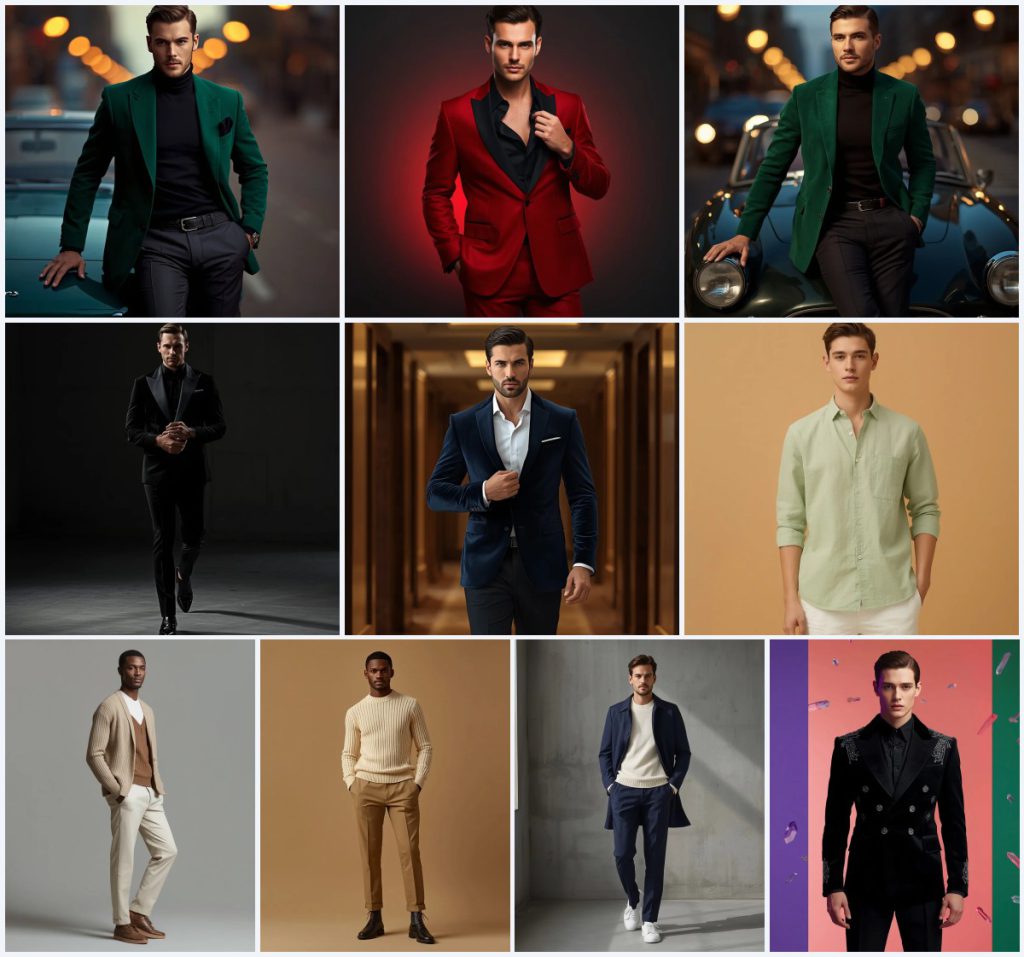
Across all ten prompts, the common thread is a stylish man in a full-body or cinematic portrait, wearing carefully described outfits that range from casual luxury to high-end couture. The AI is directed to render ultra-realistic skin textures, rich fabric details, and controlled lighting that sculpts the face and shoulders. Every scene places the subject in a clean or softly blurred environment so the focus stays on the man and his clothing.
- Full-body portrait of a stylish, handsome man
- Tailored clothing with specific materials like emerald green suede, black velvet, or pastel green linen
- Confident, relaxed posture—leaning on a vintage car, walking forward, or adjusting a cufflink
- Cinematic lighting with warm bokeh, sharp highlights, or soft natural window light
- Ultra-realistic 8K resolution with shallow depth of field and DSLR-style rendering
- Clean backgrounds: city streets at dusk, dark charcoal walls, modern hotel hallways, or warm sand-colored studios
The visual scene these prompts build
The collection creates a gallery of modern masculinity, shifting from dusk-lit streets to minimalist studios. In the first emerald green blazer prompt, the man leans against a vintage sports car while "golden streetlights creating beautiful warm bokeh" wrap the background in soft circles of light. The red carpet suit prompt pulls the subject into a darker, more dramatic space with "a clean, dark charcoal studio wall with a soft red gradient glow," making the crimson wool suit the undeniable hero of the frame.
Other scenes place the man in motion, like the black velvet tuxedo prompt where he is "walking slowly toward the camera" through "a clean, minimalist architectural space with a dark concrete texture." The navy blue velvet suit prompt expands the setting to "a modern, high-end hotel hallway with warm wood panels and soft overhead lighting." These clauses give the AI precise environmental cues that anchor the subject without stealing attention, ensuring the man remains the focal point in every generated image.
Why these prompts work for a standout DP
These prompts succeed because they combine fashion specificity with emotional tone. Instead of asking for a generic handsome man, each description names the fabric, the cut, the posture, and the light source. This level of detail forces the AI to render clothing textures and facial structure with precision, reducing the chance of a flat or cartoonish result.
- Fabric names like suede, velvet, and linen guide the AI to produce realistic material textures and drape
- Posture cues such as adjusting cufflinks or walking forward add natural movement and avoid stiff poses
- Controlled lighting descriptions create depth and sculpt the face, making the image feel like a professional portrait
Three visual styles these prompts naturally fit
Although the collection spans casual and formal looks, the prompts consistently lean into three distinct visual styles that suit men’s WhatsApp DPs. Each style stays within the boundaries of these prompts, so you can trust the AI to deliver a cohesive result without drifting into unrelated genres.
- Cinematic editorial: High-contrast lighting and shallow depth of field mimic the look of a fashion magazine spread, as seen in the crimson red suit and black velvet tuxedo prompts.
- Minimalist lifestyle: Clean backgrounds and soft natural light create a calm, modern aesthetic, perfectly matched to the pastel green linen shirt and beige cardigan prompts.
- High-end couture: Heavy textures, metallic embroidery, and dramatic runway poses push the image into luxury fashion territory, exemplified by the midnight-black suit jacket with 3D embroidery and crystalline prisms.
How to generate these DP images step by step
Turning these prompts into real display pictures takes a few deliberate steps. The process is straightforward whether you use Gemini, Midjourney, or another AI image tool. Follow this sequence to get a result that looks intentional and polished.
- Copy the prompt. Choose one prompt from the collection and copy the full text exactly as written, including all fabric and lighting details.
- Upload a reference photo. If your tool supports image input, upload a clear full-body or portrait photo of yourself in a neutral pose to guide the AI’s facial structure and build.
- Generate the image. Paste the prompt into Gemini, Midjourney, or Leonardo AI and run the generation with high-quality or 8K settings enabled.
- Check the hands. Inspect the hands carefully—look for extra fingers, unnatural bends, or blurry edges, and re-generate if they look distorted.
- Check the face. Zoom in on the eyes, jawline, and skin texture to ensure the face looks realistic and matches the confident expression described in the prompt.
- Check the main clothing. Examine the blazer, suit, or sweater for accurate fabric rendering, correct drape, and any warped patterns or missing details.
Choosing a reference photo for these prompts
A good reference photo helps the AI map your likeness onto the described outfit and posture. The reference does not need to match the prompt’s clothing—it just needs to give the AI clear data about your face and body position.
- Use a well-lit, front-facing or three-quarter portrait where your face is sharp and unobstructed
- Wear simple, fitted clothing in a neutral color so the AI can easily replace it with the prompt’s outfit
- Stand against a plain background to avoid confusing the AI with competing visual elements
AI tools to bring these prompts to life
Different AI image generators handle fabric textures, lighting, and facial realism with varying strengths. The table below compares four popular tools and explains what each one contributes when you run a prompt like the emerald green suede blazer or the navy blue velvet suit.
| Tool | Access | Typical realism | Useful here for |
|---|---|---|---|
| ChatGPT | DALL·E integration | High, with strong prompt adherence | Rendering the rich, soft texture of the emerald green suede blazer accurately |
| Google Gemini | Free and paid tiers | Very high, photorealistic output | Capturing the golden streetlight bokeh behind the vintage sports car scene |
| Leonardo AI | Freemium with credits | High, cinematic and stylized | Producing the sharp highlights and deep shadows on the black velvet tuxedo |
| Midjourney | Paid subscription | Exceptional, artistic and lifelike | Delivering the ultra-detailed textures of the midnight-black suit jacket with 3D metallic embroidery |
Three tips for getting the best DP from these prompts
Small adjustments in how you use these prompts can make a big difference in the final image. These tips focus on real materials and objects named in the collection to help you steer the AI toward a more polished result.
- Emphasize the emerald green suede blazer by adding a note in your tool to prioritize fabric texture—suede can look flat if the AI rushes the rendering
- When generating the black velvet tuxedo, watch for satin lapels that lose their sheen; re-run with higher contrast settings if the satin blends into the velvet
- For the pastel green linen shirt, request a second variation with softer shadows to preserve the relaxed, airy feel of the linen fabric
Common issues and how to fix them
Even well-written prompts can produce images with flaws. The table below lists four typical failures these men’s DP prompts might trigger and the specific changes you can make to correct them.
| Issue | What to change |
|---|---|
| The face looks generic or does not resemble the reference photo | Increase the weight of the reference image in your tool, or add a short physical description like jawline shape or eye color to the prompt |
| The suit fabric appears smooth and plastic-like instead of textured | Add the word 'macro texture' before the fabric name, such as 'macro texture emerald green suede blazer' |
| The background bokeh overwhelms the subject | Lower the bokeh intensity by replacing 'beautiful warm bokeh' with 'subtle background blur' and re-generate |
| Floating 3D crystalline prisms look messy or distract from the model | Remove the prism element or reduce its prominence by specifying 'sparse, small crystalline prisms in the background corners' |
Frequently Asked Questions
Can I use these prompts exactly as written for my own WhatsApp DP?
Yes, every prompt in this collection is ready to copy and paste into Gemini, Midjourney, or other AI image tools. You can also upload a reference photo of yourself to personalize the face while keeping the described outfit and scene.
Which prompt works best for a casual, everyday look?
The pastel green linen shirt prompt is ideal for a relaxed, everyday DP. It pairs a minimalist shirt with white linen trousers against a warm sand-colored background, creating a clean and approachable vibe without feeling overdressed.
How do I avoid distorted hands or unnatural poses in these images?
Hands and posture can glitch in AI-generated portraits. Choose prompts with clear hand placements, like one hand resting on a car hood or adjusting a cufflink, and re-generate if fingers appear fused or bent. Some tools also offer inpainting to fix small hand errors.
Conclusion
This collection of ten WhatsApp DP AI prompts gives you a versatile toolkit for creating stylish, cinematic display pictures that feel personal and polished. From the rich texture of an emerald green suede blazer to the clean lines of a pastel green linen shirt, each prompt is built to produce images with strong masculine presence and realistic detail. Use the step-by-step guide, reference photo tips, and troubleshooting table to refine your results, and remember that small tweaks to fabric emphasis or lighting can transform a good image into a great one. Your WhatsApp DP is a tiny canvas—these prompts help you fill it with intention.
Make sure you have the right to edit any reference photo you upload, especially if it includes identifiable people or copyrighted elements.